UTM Chrome Extension: Build a UTM Link Right From Your Open Tab
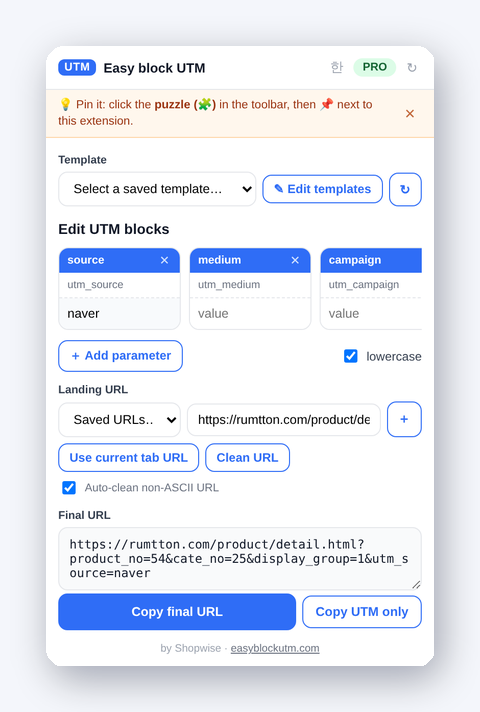
The most tedious part of building a UTM link is often just copying the address of the page you want to tag. Open the product page, copy the URL, switch to the builder, paste — the Easy block UTM extension removes that round trip. Once installed, you can build and copy a UTM link right from the tab you already have open.
How it works
- Install the extension and pin it (📌) to your toolbar.
- With the product or landing page open, click the extension icon.
- The popup opens with the current tab's URL already filled in. Enter your utm_source, medium, and campaign values and the final link assembles in real time.
- Copy in one click and paste it straight into your ad or post.
Auto-clean Korean URLs into tidy ASCII
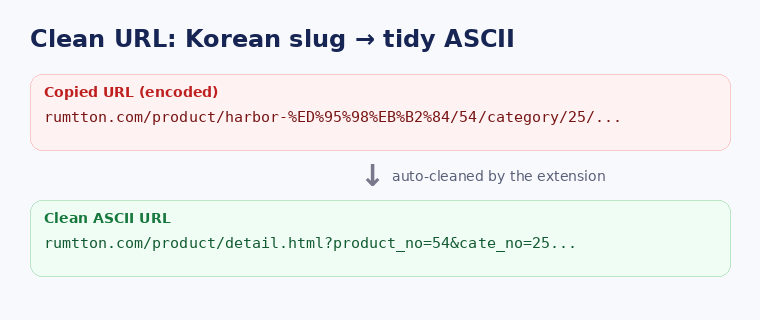
Korean commerce URLs often contain non-ASCII slugs. A Cafe24 SEO URL may look like /product/harbor-watch-하버/54/…, and copying it yields hard-to-read encoding like %ED%95%98…. The extension's "Clean URL" feature extracts the product number and rewrites it into a clean, ASCII-only link — e.g. /product/detail.html?product_no=54&cate_no=25&display_group=1 — short and tidy for ads and reports.
Supported Korean commerce platforms
It recognizes the URL structure of major Korean platforms and converts non-ASCII SEO URLs into their original ASCII form.
- Cafe24 —
/product/detail.html?product_no=… - Godomall (NHN Godo) —
/goods/goods_view.php?goodsNo=… - MakeShop —
/shop/shopdetail.html?branduid=… - Youngcart (Gnuboard) —
/shop/item.php?it_id=… - Imweb —
/shop_view/?idx=… - Sixshop & Naver SmartStore — already numeric ASCII URLs, used as-is
URLs outside these rules still work: if a clean ASCII form can't be built, it falls back to a human-readable decoded URL, so links never break on any site.
Load your web account templates
If you're a Pro member signed in at easyblockutm.com, you can load the UTM templates you saved on the web right inside the extension. Fill a whole setup like "Google Search Ads" or "Meta Ads" in one click and just change the campaign name. The "Edit templates" button opens the web builder to manage them.
Chrome, Edge, Firefox — Korean & English
The same extension is available on the Chrome Web Store, Microsoft Edge Add-ons, and Firefox (AMO). It shows in Korean or English based on your browser language, and you can switch languages inside the popup.
Install
Search "Easy block UTM" in the Chrome Web Store, install it, and pin it from the toolbar puzzle (🧩) icon. Then click the icon on any product page. Building UTMs and cleaning URLs is free; web account sync, groups, and unlimited saves are Pro (with a 7-day free trial).
See also → Build UTMs with drag and drop · Per-channel conventions · Pricing & Pro